When you enroll in this course, you'll also be enrolled in this Specialization.
Learn new concepts from industry experts
Gain a foundational understanding of a subject or tool
Develop job-relevant skills with hands-on projects
Earn a shareable career certificate
There are 5 modules in this course
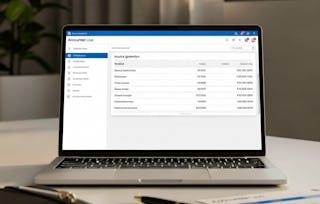
Learners will analyze financial data, manage sales and purchase workflows, configure core accounting settings, and apply advanced reporting and automation tools using Zoho Books. This course equips participants with job-ready skills for modern cloud-based accounting workflows.
Throughout the program, learners gain hands-on experience navigating the Zoho Books interface, setting up organizations, securing accounts with two-factor authentication, configuring templates and currencies, and managing products, items, contacts, and projects. They will also learn to process invoices, estimates, retainers, bills, recurring expenses, and bank feeds with accuracy and confidence. Advanced modules introduce journal adjustments, time tracking, project billing methods, and comprehensive financial reporting for data-driven decision-making.
What makes this course unique is its step-by-step, real-workflow approach, using actual SaaS accounting scenarios that mirror professional practices. Each module builds practical competency, preparing learners to support small businesses, manage freelance accounting, or contribute to larger finance teams. By the end, participants will be able to interpret reports and optimize business operations using Zoho Books’ powerful cloud features.
This module introduces learners to the fundamentals of SaaS-based accounting, core bookkeeping concepts, and the initial setup process inside Zoho Books, enabling them to work confidently within a cloud-based financial ecosystem.
What's included
6 videos3 assignments
Show info about module content
6 videos•Total 49 minutes
Introduction to SAAS based Accounting•10 minutes
Getting Started with Zoho Books Setup•10 minutes
Foundations of Cloud-Based Accounting•30 minutes
Navigating and Configuring Zoho Books
Module 2•2 hours to complete
Module details
This module guides learners through Zoho Books’ interface, dashboard insights, organization setup, and essential security and branding configurations, ensuring a secure and professionally branded financial system.
What's included
5 videos3 assignments
Show info about module content
5 videos•Total 40 minutes
Learn the User Interface•7 minutes
Understand Dashboard•9 minutes
Create New Organizations•8 minutes
Two Factor Authentication•7 minutes
Branding - Portal Settings•9 minutes
3 assignments•Total 50 minutes
Exploring the Zoho Books Interface•10 minutes
Essential Security and Branding Settings•10 minutes
Navigating and Configuring Zoho Books•30 minutes
Mastering Core Accounting Setup
Module 3•2 hours to complete
Module details
This module focuses on setting up accurate opening balances, configuring general preferences, customizing templates, and managing products, items, and contacts to ensure consistent, error-free financial operations.
What's included
11 videos4 assignments
Show info about module content
11 videos•Total 72 minutes
Opening Balances•5 minutes
Opening Balances Continues•7 minutes
Opening Balances Adjustment•5 minutes
Users and Roles•7 minutes
Basic General Settings•7 minutes
Preferences and Currencies•7 minutes
Working on Templates•7 minutes
Working with Products•7 minutes
Working with Items•6 minutes
Working with Contacts•7 minutes
Working with Contacts Continues•7 minutes
4 assignments•Total 60 minutes
Opening Balances and User Controls•10 minutes
Customizing System Preferences•10 minutes
Managing Products, Items & Contacts•10 minutes
Mastering Core Accounting Setup•30 minutes
Sales, Purchases & Banking Operations
Module 4•3 hours to complete
Module details
This module teaches learners how to manage banking connections, create sales and purchase transactions, work with estimates and retainers, track vendor expenses, and streamline complete sales-to-purchase workflows in Zoho Books.
This module covers advanced accounting tools, journal adjustments, time-tracking workflows, project billing, and comprehensive reporting techniques to support data-driven decision-making in Zoho Books.
What's included
8 videos4 assignments
Show info about module content
8 videos•Total 66 minutes
Working with Accountant•7 minutes
Working with Accountant Continues•10 minutes
Timesheet and Projects•6 minutes
Website Designing - Timesheet•8 minutes
New Log Entry•10 minutes
New Project -Timesheet•8 minutes
Working with Reports•8 minutes
Conclusion•8 minutes
4 assignments•Total 60 minutes
Advanced Accounting Tools•10 minutes
Timesheets and Project Tracking•10 minutes
Reports & Course Wrap-Up•10 minutes
Advanced Accounting, Time Tracking & Reporting•30 minutes
Earn a career certificate
Add this credential to your LinkedIn profile, resume, or CV. Share it on social media and in your performance review.
Instructor
Instructor ratings
Instructor ratings
We asked all learners to give feedback on our instructors based on the quality of their teaching style.
Welcome to EDUCBA, a place where knowledge is limitless! We provide a wide selection of instructive and engaging programmes designed to empower students of all ages and experiences. From the convenience of your home, start a revolutionary educational experience with our cutting-edge technologies courses and experienced instructors.
When will I have access to the lectures and assignments?
To access the course materials, assignments and to earn a Certificate, you will need to purchase the Certificate experience when you enroll in a course. You can try a Free Trial instead, or apply for Financial Aid. The course may offer 'Full Course, No Certificate' instead. This option lets you see all course materials, submit required assessments, and get a final grade. This also means that you will not be able to purchase a Certificate experience.
What will I get if I subscribe to this Specialization?
When you enroll in the course, you get access to all of the courses in the Specialization, and you earn a certificate when you complete the work. Your electronic Certificate will be added to your Accomplishments page - from there, you can print your Certificate or add it to your LinkedIn profile.
Is financial aid available?
Yes. In select learning programs, you can apply for financial aid or a scholarship if you can’t afford the enrollment fee. If fin aid or scholarship is available for your learning program selection, you’ll find a link to apply on the description page.