When you enroll in this course, you'll also be enrolled in this Specialization.
Learn new concepts from industry experts
Gain a foundational understanding of a subject or tool
Develop job-relevant skills with hands-on projects
Earn a shareable career certificate
There are 2 modules in this course
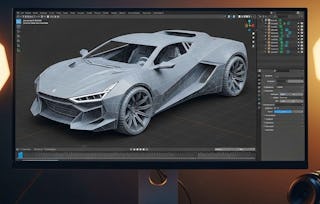
By the end of this course, learners will be able to set up a Blender workspace, sketch and refine a car blueprint, construct complex geometries, apply realistic materials, render scenes in Eevee, and export models into Unreal Engine.
This practical, hands-on course takes students step by step through the process of creating a professional-quality 3D car. Starting with reference images and environment setup, learners will build the foundation by sketching outlines, refining curves, and shaping the front profile. They will then add essential components such as wheels, headlights, and mirrors, before applying materials that bring the design to life. Finally, students will learn how to render in Eevee for realistic visuals and export the finished model into Unreal Engine for real-world applications.
What makes this course unique is its project-based learning approach — every lesson contributes directly to building a complete car model from scratch, ensuring practical skills and portfolio-ready results. Whether aiming for careers in 3D modeling, game design, or animation, learners gain both technical knowledge and creative confidence.
This module introduces learners to the fundamentals of setting up Blender, using reference images, and building the foundational geometry of a car. Students will progress from sketching the outline to shaping curves and defining the front profile, ensuring accurate proportions for a realistic base model.
What's included
7 videos4 assignments
Show info about module content
7 videos•Total 87 minutes
Setting Up The Working Environment•12 minutes
Sketching The Car Shape•13 minutes
Sketching The Car Shape Continue•13 minutes
Curvature Side of Car•11 minutes
Curvature Side of Car Continue•10 minutes
Front of The Car•12 minutes
Hood of The Car•16 minutes
4 assignments•Total 60 minutes
Designing the Car Blueprint•30 minutes
Setting the Stage•10 minutes
Refining the Car Outline•10 minutes
Building the Front Profile•10 minutes
Detailing and Bringing the Car to Life
Module 2•3 hours to complete
Module details
This module focuses on adding critical details, applying realistic materials, and preparing the car model for rendering and export. Learners will enhance their design with wheels, headlights, and mirrors, then finalize the project by rendering in Eevee and exporting into Unreal Engine for real-world applications.
What's included
9 videos4 assignments
Show info about module content
9 videos•Total 76 minutes
The Wheels•11 minutes
The Wheels Continue•10 minutes
Fixing The Headlight Topography•10 minutes
Creating The Rear View Mirror•8 minutes
Creating The Rear View Mirror Continue•6 minutes
Creating Materials•10 minutes
RenderingIn Eevee•8 minutes
RenderingIn Eevee Continue•8 minutes
Exporting To Unreal•5 minutes
4 assignments•Total 60 minutes
Detailing and Bringing the Car to Life•30 minutes
Essential Car Components•10 minutes
Adding Realistic Touches•10 minutes
Rendering and Exporting•10 minutes
Earn a career certificate
Add this credential to your LinkedIn profile, resume, or CV. Share it on social media and in your performance review.
Instructor
Instructor ratings
Instructor ratings
We asked all learners to give feedback on our instructors based on the quality of their teaching style.
Welcome to EDUCBA, a place where knowledge is limitless! We provide a wide selection of instructive and engaging programmes designed to empower students of all ages and experiences. From the convenience of your home, start a revolutionary educational experience with our cutting-edge technologies courses and experienced instructors.
"To be able to take courses at my own pace and rhythm has been an amazing experience. I can learn whenever it fits my schedule and mood."
Jennifer J.
Learner since 2020
"I directly applied the concepts and skills I learned from my courses to an exciting new project at work."
Larry W.
Learner since 2021
"When I need courses on topics that my university doesn't offer, Coursera is one of the best places to go."
Chaitanya A.
"Learning isn't just about being better at your job: it's so much more than that. Coursera allows me to learn without limits."
Learner reviews
5.0
13 reviews
5 stars
100%
4 stars
0%
3 stars
0%
2 stars
0%
1 star
0%
Showing 3 of 13
D
DM
5·
Reviewed on Feb 23, 2026
The course does a fantastic job of explaining Blender’s tools in a practical context. Rendering in Eevee and exporting to Unreal Engine adds real-world industry relevance.
H
HD
5·
Reviewed on Feb 19, 2026
This course provides a clear and structured workflow from blueprint setup to final rendering. The practical focus ensures that every lesson contributes to a polished, portfolio-ready project.
A
AK
5·
Reviewed on Feb 21, 2026
A highly engaging course that blends creativity with technical precision. I particularly appreciated the detailed guidance on refining curves, shaping geometry, and applying realistic materials.
When will I have access to the lectures and assignments?
To access the course materials, assignments and to earn a Certificate, you will need to purchase the Certificate experience when you enroll in a course. You can try a Free Trial instead, or apply for Financial Aid. The course may offer 'Full Course, No Certificate' instead. This option lets you see all course materials, submit required assessments, and get a final grade. This also means that you will not be able to purchase a Certificate experience.
What will I get if I subscribe to this Specialization?
When you enroll in the course, you get access to all of the courses in the Specialization, and you earn a certificate when you complete the work. Your electronic Certificate will be added to your Accomplishments page - from there, you can print your Certificate or add it to your LinkedIn profile.
Is financial aid available?
Yes. In select learning programs, you can apply for financial aid or a scholarship if you can’t afford the enrollment fee. If fin aid or scholarship is available for your learning program selection, you’ll find a link to apply on the description page.