How to Create a Google Video Ads Campaign
Learn how to design a Google video ads campaign and create video ads using the Google Ads Asset library.
![[Featured image] Person holds a smartphone and listens as Google video ads play.](https://d3njjcbhbojbot.cloudfront.net/api/utilities/v1/imageproxy/https://images.ctfassets.net/wp1lcwdav1p1/304lRXBre5NFku7CRLHm1T/c4aae25b057a64b7a173de2840497080/1061497432.jpeg?w=1500&h=680&q=60&fit=fill&f=faces&fm=jpg&fl=progressive&auto=format%2Ccompress&dpr=1&w=1000)
Key takeaways
To create a Google video ads campaign, navigate to your Google Ads account, click on the Campaigns icon, and choose your campaign goal.
For a video ad campaign, you can select Create a campaign without guidance as your campaign goal.
Based on your marketing goals, you can choose between an average daily budget or a campaign total budget.
You can use Google video ads campaigns to increase brand awareness and drive website traffic.
Discover how to create Google video ads and launch a video campaign to reach potential customers. Afterward, if you are ready to boost your sales, enroll in the Google Digital Marketing & E-commerce Professional Certificate. You’ll have the opportunity to learn how to attract and engage customers through digital marketing channels like search and email.
What are Google video ads?
Google video ads campaigns let you place your products and services on YouTube and other Google video partners. By creating your video ads campaigns, you may be able to increase brand awareness and drive website traffic. You can also measure your achievements with Google Ads analytics tools, which can track TrueView views (formerly “views”), costs, and budget. Google Ads also gives you access to its Asset library, where you'll find templates to help create your ads.
How to create a Google video ads campaign
To create a Google video ads campaign, you’ll need to:
Create a campaign.
Set your budget.
Determine who you will target.
Create ad groups.
Create ads.
Let’s look at each of these steps in closer detail.
1. Create a campaign.
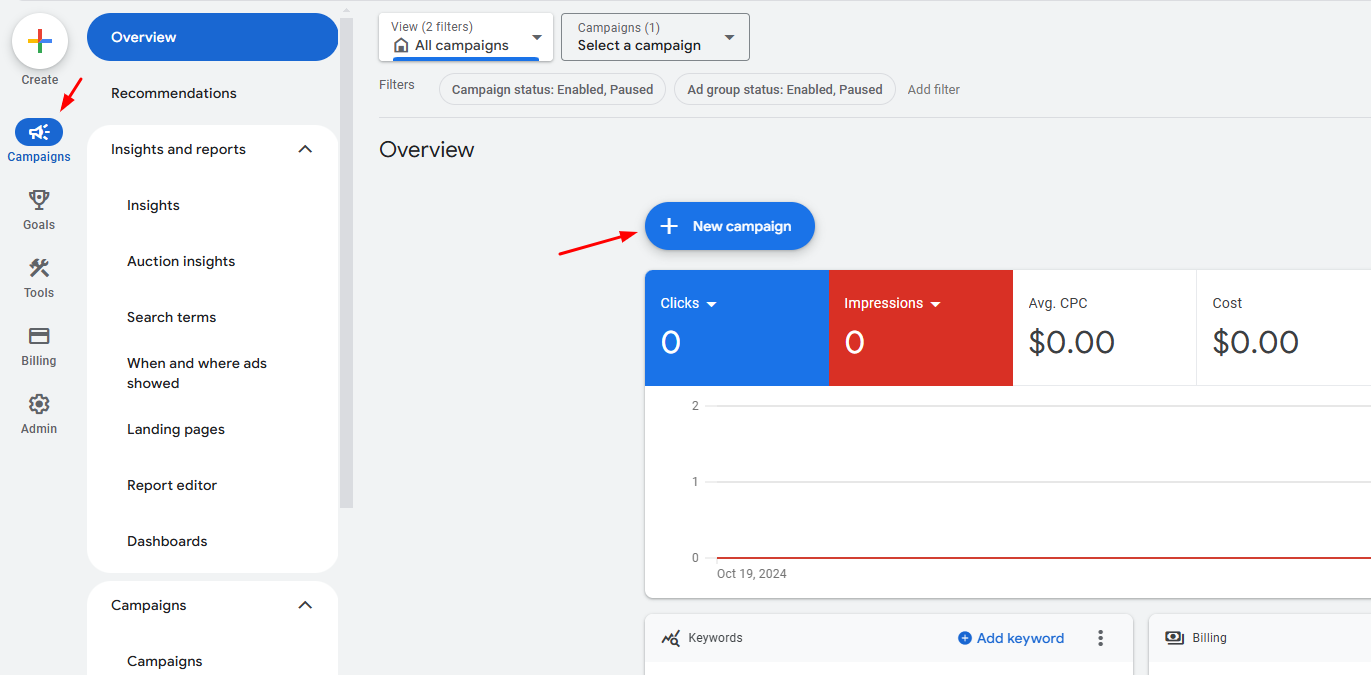
Open your Google Ads account and click the Campaigns icon. Then, click the + and select New campaign.
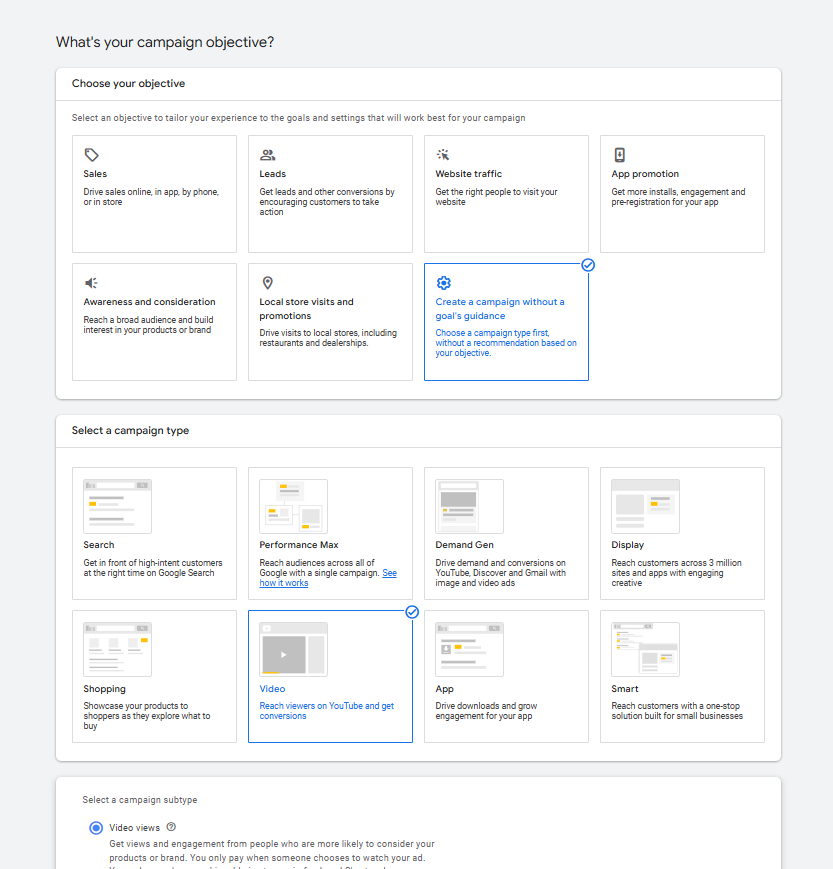
Next, you’ll choose your campaign’s goal, which will determine the available campaign subtypes offered by Google Ads. You can choose from the following options:
Sales
Leads
Website traffic
Awareness and consideration
Create a campaign without guidance
Since you’re creating a video ad campaign, you’ll choose Create a campaign without guidance. A box labeled “Select a campaign type” will appear, and you'll choose Video.
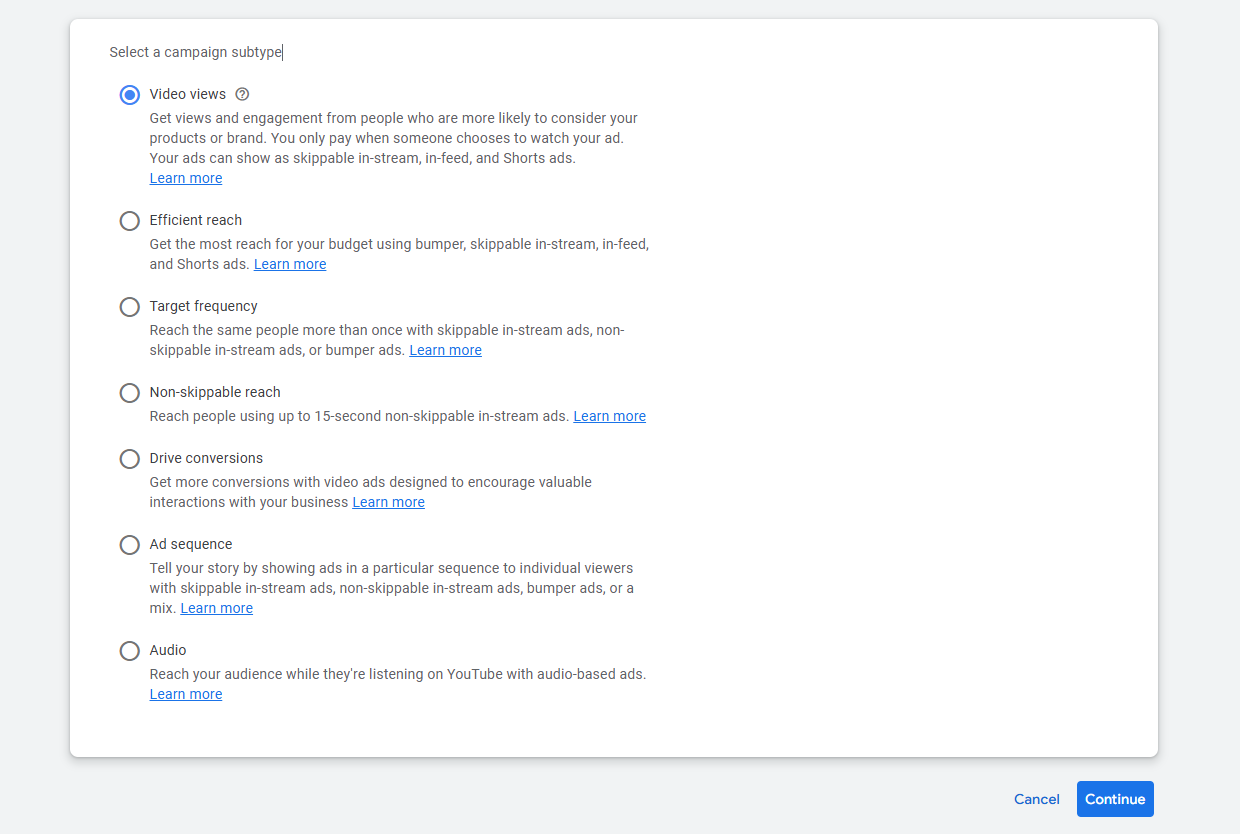
Choose a subtype depending on your goal for the video campaign and press Continue.
2. Set budget and bid strategy.
Next, configure your bid strategy and daily budget. These settings will influence how often your ads are shown. Your bid strategy defines how you pay for ads and which metrics, if any, you optimize for in your campaign.
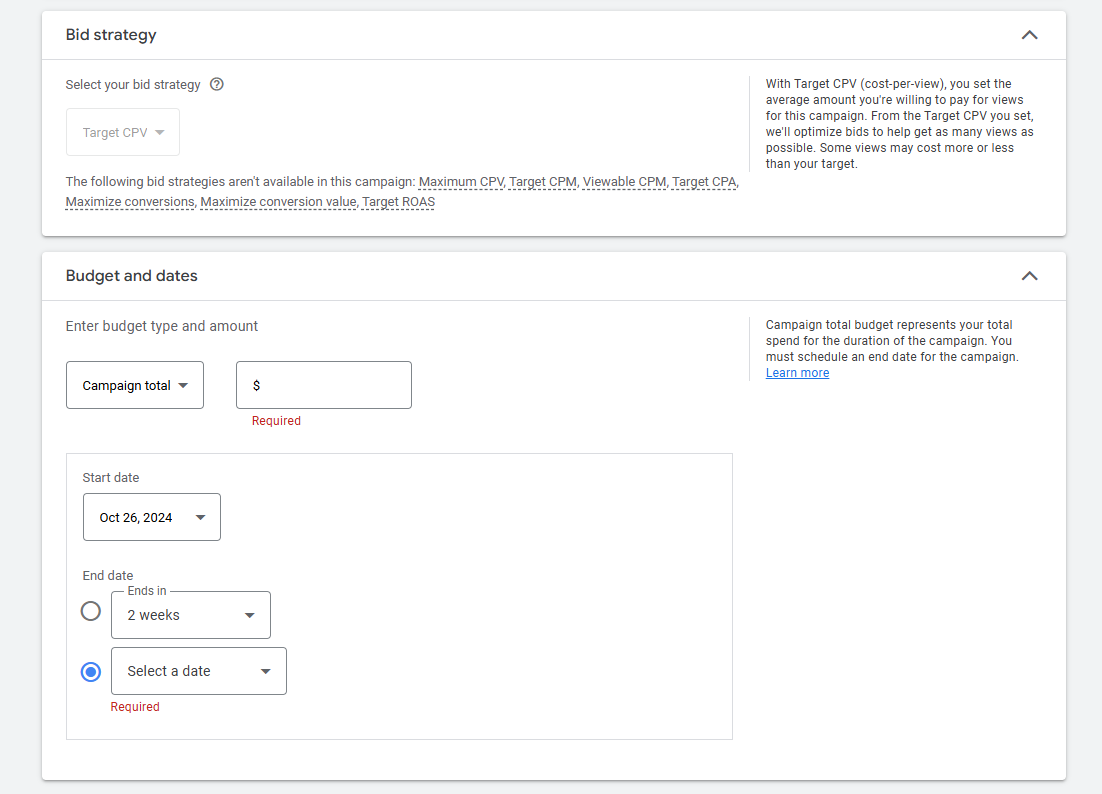
You can choose between an average daily budget or a campaign total budget. You will also set a start and end date for your campaign.
Is $20 a day good for Google Ads?
A $20-per-day Google Ads budget is a practical option for small businesses operating in less competitive markets. Factors like keyword competitiveness, ad relevance, and Google Ads’ Quality Score influence your campaign’s overall cost. Typically, you pay only when users take action, like clicks or calls, enabling you to fine-tune your spending in response to campaign performance.


3. Determine filters for targeting.
Next, you will determine which filters your ad campaign will need to reach your target audience. This includes which networks you want to run your ads on, language preferences, your viewers’ geographic location, and any content you want excluded from showing your ads.

Read more: How Do You Identify and Define Your Target Market?
4. Create ad groups.
Ad groups help you organize your campaigns by topic or theme. You'll identify your target audience to increase your chances of reaching people interested in your product or service.
Google Ads will create a default Ad group name for you. Change this if you would like to by typing up to 256 characters. Next, click on the dropdown menus to add your:
Audience name
Demographics
Interests and detailed demographics
Your business data
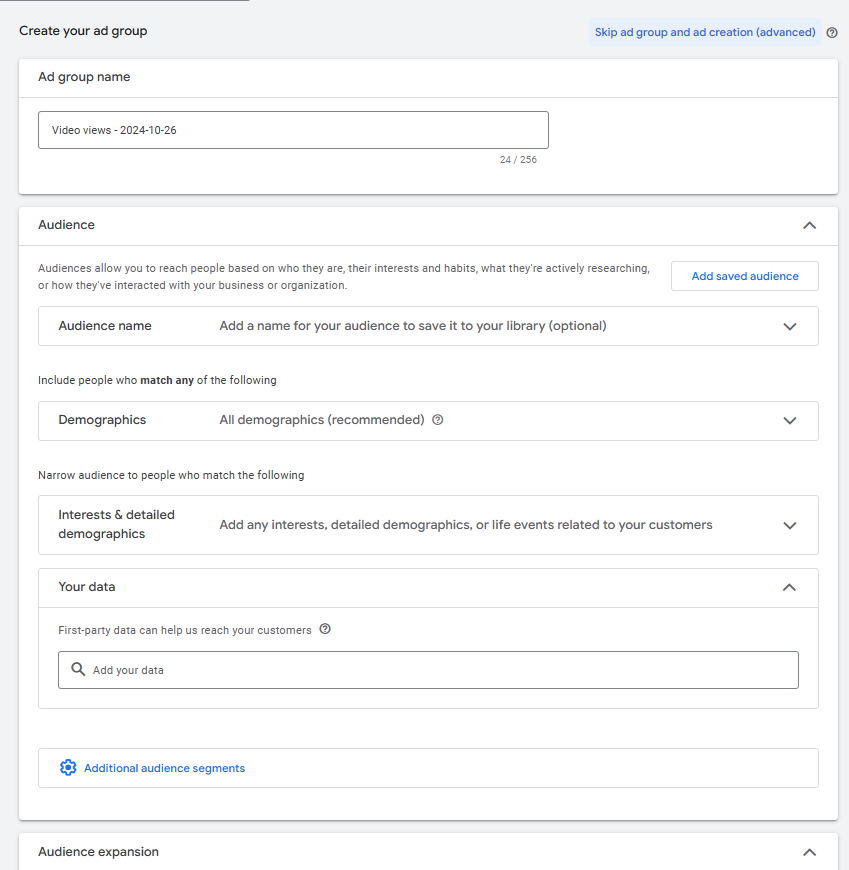
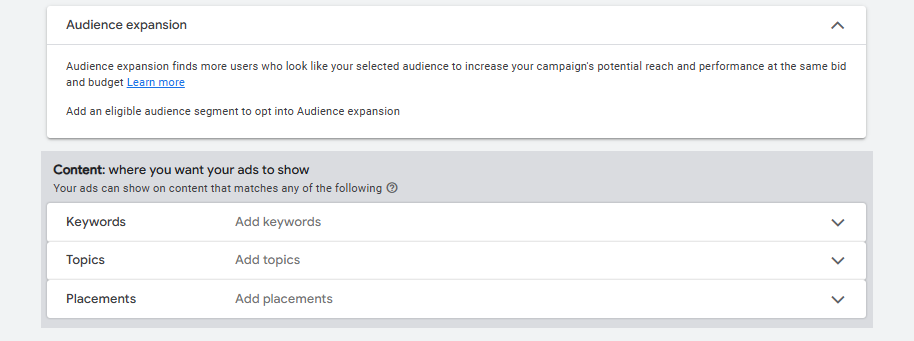
You can also toggle Audience expansion on or off. Having it on can help you reach a wider audience. Also, choose Keywords, Topics, and Placements to increase where your ads show.
5. Create ads.
The last step is to create your video ads. A campaign can include up to 50 ads. You can choose a template from the Asset library or create the video yourself and upload it to YouTube.

To create a video using the Asset library, click the Tools icon on the homepage of your Google Ads account. Go to Asset Studio, select Asset library, then click the + button. Finally, select Create video.

The site will prompt you to choose a template and add assets such as colors, images, logos, and text. After you finish, click Continue to upload to generate an ad. You can make changes with Edit video.

Now, you can upload your video to your YouTube account and use it in a Google video ads campaign.
Check out our free resources on digital marketing
Subscribe to Career Chat on LinkedIn to get weekly updates on popular skills, tools, and certifications. Learn more about digital marketing with our other free resources:
Watch on YouTube: 5 AI Tools That Will TRANSFORM Your Digital Marketing Strategy
Explore certifications: 6 digital marketing certificates for future marketing pros
Discover career paths: Digital Marketing Career Progression: Job Levels & Skills to Advance
Accelerate your career growth with a Coursera Plus subscription. When you enroll in either the monthly or annual option, you’ll get access to over 10,000 courses.



Coursera Staff
Editorial Team
Coursera’s editorial team is comprised of highly experienced professional editors, writers, and fact...
This content has been made available for informational purposes only. Learners are advised to conduct additional research to ensure that courses and other credentials pursued meet their personal, professional, and financial goals.